看到柳神的网站有这种菜单,但是没有写魔改教程,只好自己慢慢摸索了。
预计做好后是这种效果:
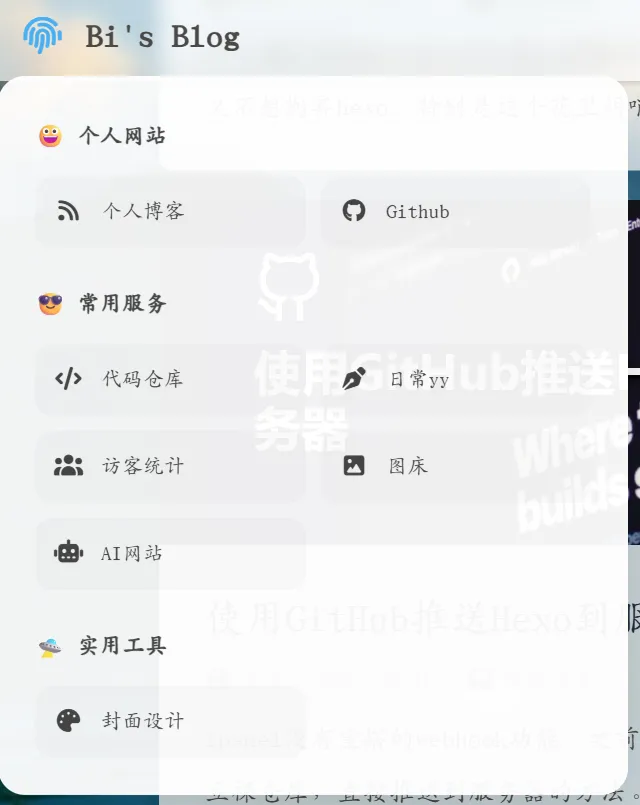
首先,修改\themes\butterfly\layout\includes\header\nav.pug:
1 2 3 4 5 6 7 8 9 10 11 12 13 14 15 16 17 18 19 20 21 22 23 24 25 26 27 28 29 30 31 32 33 34 35 36 37 38 39 40 41 42 43 44 45 46 47 48 49 50 51 nav#nav //- 左侧区域:包含指纹菜单和网站名 span#blog-info #ls-menu-container i.fas.fa-fingerprint #ls-menu-panel .ls-section .ls-title 😀 个人网站 .ls-grid a(href="/") #[i.fas.fa-rss] 个人博客 a(href="https://github.com/bishshi") #[i.fab.fa-github] Github .ls-section .ls-title 😎 常用服务 .ls-grid a(href="https://git.biss.click/biss") #[i.fas.fa-code] 代码仓库 a(href="https://mm.biss.click") #[i.fas.fa-pen-nib] 日常yy a(href="https://statstic.biss.click") #[i.fas.fa-users] 访客统计 a(href="https://pic.biss.click") #[i.fas.fa-image] 图床 a(href="https://chat.biss.click") #[i.fas.fa-robot] AI网站 .ls-section .ls-title 🛸 实用工具 .ls-grid a(href="https://cover.biss.click") #[i.fas.fa-palette] 封面设计 a.nav-site-title(href=url_for('/')) if theme.nav.logo img.site-icon(src=url_for(theme.nav.logo) alt='Logo') if theme.nav.display_title span.site-name=config.title //- 中间区域:关键!必须在 nav 下一级,以便 JS 切换类名 if globalPageType === 'post' && theme.nav.display_post_title a.nav-page-title(href='javascript:void(0);' onclick='btf.scrollToDest(0, 500)') span.site-name=(page.title || config.title) //- 右侧区域 #nav-right if theme.menu #menus != partial('includes/header/menu_item', {}, {cache: true}) if theme.search.use || true #random-post-button a.site-page.social-icon#random-post-link(href='javascript:void(0);' onclick='randomPost()') i.fas.fa-solid.fa-shuffle #search-button a.site-page.social-icon.search-typesense-trigger i.fas.fa-search.fa-fw #toggle-menu span.site-page i.fas.fa-bars.fa-fw
在合适的目录下新建nav.css(例如\themes\butterfly\source\css\nav.css),这份css是磨砂玻璃的样式:
1 2 3 4 5 6 7 8 9 10 11 12 13 14 15 16 17 18 19 20 21 22 23 24 25 26 27 28 29 30 31 32 33 34 35 36 37 38 39 40 41 42 43 44 45 46 47 48 49 50 51 52 53 54 55 56 57 58 59 60 61 62 63 64 65 66 67 68 69 70 71 72 73 74 75 76 77 78 79 80 81 82 83 84 85 86 87 88 89 90 91 92 93 94 95 96 97 98 99 100 101 102 103 104 105 106 107 108 109 110 111 112 113 114 115 116 117 118 119 120 121 122 123 124 125 126 127 128 129 130 131 132 133 134 135 136 137 138 139 140 141 142 143 144 145 146 147 148 149 150 151 152 153 154 155 156 157 158 159 160 161 162 163 164 165 166 167 168 169 170 171 172 173 174 175 176 177 178 179 180 181 182 183 184 185 186 187 188 189 190 191 192 193 194 195 196 197 198 199 200 201 202 203 #nav-right { flex :1 1 auto; justify-content : flex-end; margin-left : auto; display : flex; flex-wrap :nowrap; } #sidebar #sidebar-menus .menus_items .menus_item { margin : 10px 0 ; } #sidebar #sidebar-menus .menus_items a .site-page { padding-left : 0 ; } #sidebar #sidebar-menus .menus_items .site-page { position : relative; display : block; padding : 6px 30px 6px 22px ; color : var (--font-color); font-size : 1.15em ; border : var (--style-border-always); background : var (--icat-card-bg); font-size : 14px ; border-radius : 12px ; } #sidebar #sidebar-menus .menus_items .site-page i :first-child { text-align : left; padding-left : 10px ; } #nav #menus { display : flex; justify-content : center; width : 100% ; position : absolute; left : 0 ; margin : 0 ; transform : translateZ (0 ); } #nav #blog-info { flex-wrap : nowrap; display : flex; align-items : center; z-index : 102 ; max-width : fit-content; } @media screen and (max-width : 900px ) { #nav { padding : 0 15px ; } #nav-group { padding : 0 0.2rem ; } #rightside { right : -42px ; } } #nav , #blog-info , #nav-group { overflow : visible !important ; } #ls-menu-container { position : relative !important ; display : inline-flex !important ; align-items : center; height : 100% ; padding : 0 15px ; cursor : pointer !important ; z-index : 2000 !important ; } #ls-menu-panel { position : absolute !important ; top : 100% !important ; left : 0 !important ; margin-top : 15px !important ; width : 420px ; padding : 24px ; border-radius : 18px ; background : rgba (255 , 255 , 255 , 0.95 ) !important ; backdrop-filter : blur (20px ) saturate (180% ) !important ; -webkit-backdrop-filter : blur (20px ) saturate (180% ) !important ; border : 1px solid rgba (255 , 255 , 255 , 0.5 ) !important ; box-shadow : 0 20px 50px rgba (0 , 0 , 0 , 0.18 ) !important ; opacity : 0 !important ; visibility : hidden !important ; transform : translateY (12px ) !important ; transition : all 0.3s cubic-bezier (0.4 , 0 , 0.2 , 1 ) !important ; z-index : 999999 !important ; cursor : default; } #ls-menu-panel ::before { content : "" ; position : absolute; top : -20px ; left : 0 ; right : 0 ; height : 25px ; background : transparent !important ; } #ls-menu-container :hover #ls-menu-panel { opacity : 1 !important ; visibility : visible !important ; transform : translateY (0 ) !important ; } #ls-menu-container :hover i .fa-fingerprint { color : #49b1f5 ; transform : scale (1.1 ); } .ls-section { margin-bottom : 22px ; }.ls-section :last-child { margin-bottom : 0 ; }.ls-title { color : #333 ; font-weight : 800 ; font-size : 15px ; margin-bottom : 12px ; opacity : 0.9 ; } .ls-grid { display : grid !important ; grid-template-columns : repeat (2 , 1 fr); gap : 10px ; } .ls-grid a { color : #444 !important ; font-size : 14px !important ; padding : 10px 12px ; border-radius : 12px ; display : flex; align-items : center; transition : all 0.2s ease; background : rgba (0 , 0 , 0 , 0.02 ); } .ls-grid a :hover { background : #49b1f5 !important ; color : #fff !important ; transform : translateX (4px ); } .ls-grid a i { margin-right : 12px ; width : 20px ; text-align : center; font-size : 15px ; } [data-theme='dark' ] #ls-menu-panel { background : rgba (30 , 30 , 30 , 0.95 ) !important ; border-color : rgba (255 , 255 , 255 , 0.1 ) !important ; } [data-theme='dark' ] .ls-title { color : #eee ; }[data-theme='dark' ] .ls-grid a { color : #ccc !important ; background : rgba (255 , 255 , 255 , 0.05 ); } #nav .show-title .nav-page-title { display : flex !important ; opacity : 1 !important ; visibility : visible !important ; position : absolute !important ; left : 50% !important ; transform : translateX (-50% ) !important ; white-space : nowrap !important ; z-index : 1000 !important ; } #nav .show-title #menus ,#nav .show-title .nav-site-title { opacity : 0 !important ; visibility : hidden !important ; pointer-events : none !important ; } #nav .nav-page-title { display : none; transition : opacity 0.3s ease; } #nav #blog-info { overflow : visible !important ; }
然后在_config.butterfly.yml里面引用该css
1 - <link rel="stylesheet" href="/css/nav.css">
然后重新构建应该就可以看到效果了。